
Next step
Inventory & Route Workflows
Review how stock visibility, merchandising, and route workflows fit into one operating layer.
View inventory workflowsA planogram becomes useful only when it shapes route decisions, refill prep, and what the shopper actually sees on the machine. If it lives in a spreadsheet no one trusts, it is not a merchandising tool, it is just admin theatre with extra steps.
This guide explains where vending planogram software fits in a live deployment, what usually goes wrong first, and why what a vending planogram should actually control tends to shape the next buying decision more than a glossy feature list ever will.
Use it when the conversation has moved beyond light research and someone now needs a practical brief they can carry into compatibility review, procurement, or rollout planning.
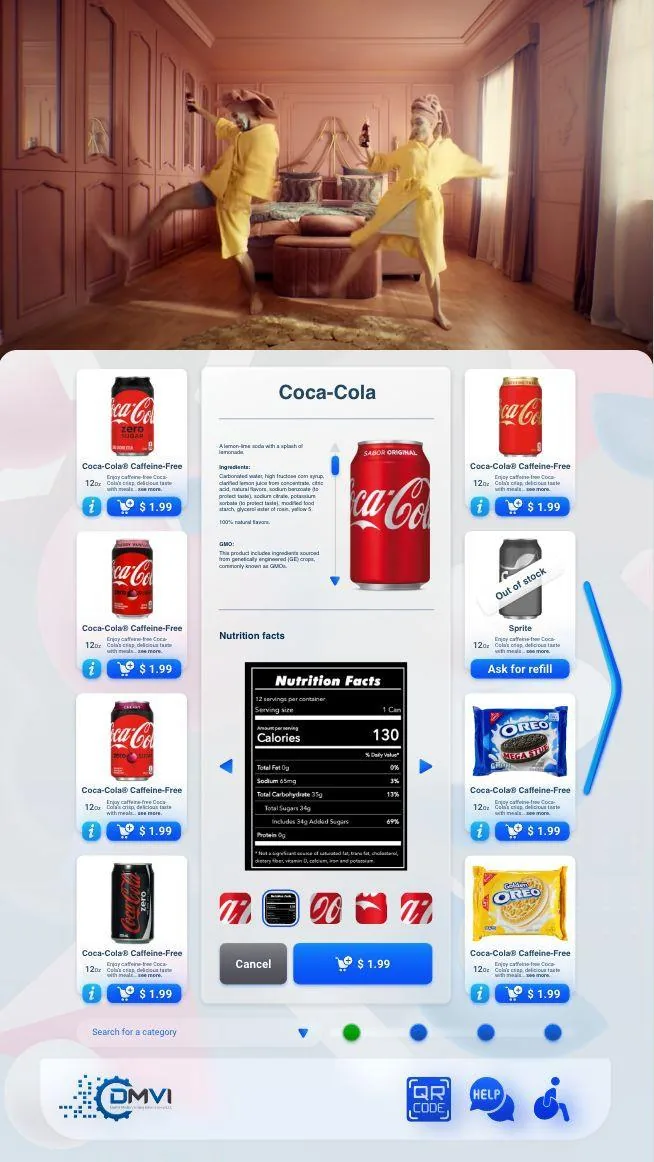
Planogram control and merchandising workflows in vending affects more than headline positioning. It changes rollout sequencing, workflow ownership, and which assumptions need to be confirmed before money or hardware is committed.
This guide walks through vending planogram software in operational terms, with particular attention to what a vending planogram should actually control and the surrounding decisions buyers usually need answered before the project can move forward.
The goal is to give operations, procurement, compliance, and implementation stakeholders a shared working brief instead of leaving each team to infer the hard bits separately.
When the project is ready, the same questions can be carried directly into a scoped demo or compatibility review with the machine model, region, and deployment objective already defined.
A useful vending planogram is more than a picture of where snacks sit in the cabinet. In practice it should define slot assignments, facings, product mix, price assumptions, capacity, and replenishment intent so the machine, the route team, and the commercial owner are all working from the same merchandising logic.
That is why planograms matter commercially, not just visually. They influence what the shopper sees first, how often products run out, how easy the machine is to refill, and whether route teams spend their day executing a coherent assortment strategy or improvising in front of every cabinet.
Planograms usually fail when they are treated as static spreadsheet artwork rather than part of an operating workflow. If the layout is not tied to sales data, dead-slot patterns, spoilage risk, substitutions, and refill prep, the document quickly stops reflecting reality and the route team stops trusting it.
That is also why over-assortment hurts so many operators. A cabinet can look exciting on paper while still performing badly because too many low-velocity SKUs create false out-of-stocks, awkward replenishment, and wasted inventory that should never have been given premium space.
The planogram becomes genuinely valuable when it shapes what the driver brings, how pre-pick lists are prepared, and how quickly the cabinet can be restored to target state. That operational link is what turns merchandising theory into service efficiency.
When truck loads, refill priorities, and warehouse prep all reflect the intended planogram, route execution gets faster and more consistent. When they do not, the driver ends up making commercial decisions on the fly at the machine, which is charming in folklore and expensive in practice.
Most operators benefit from a standard base planogram by machine type or venue class because it simplifies training and makes performance comparisons cleaner. But the strongest fleets also allow sensible local overrides because an office, a school, a hotel, and a regulated environment may not deserve the same assortment logic.
This is where software earns its keep. The goal is not rigid uniformity for its own sake. The goal is controlled variation that can still be managed, measured, and improved across the fleet instead of vanishing into one-off exceptions.
Buyers should test whether slot changes are easy to manage, whether product movement is visible after those changes, and whether the platform helps the operator see the commercial effect of a layout decision rather than simply storing the diagram. A planogram tool that cannot connect layout changes to sales and refill behaviour is only doing half the job.
They should also ask how the workflow handles substitutions, dead coils, seasonal resets, price changes, and machine-family differences. These are the normal pressures that turn a tidy layout into a living merchandising discipline.
The best metrics are operational and commercial at the same time: sell-through, stockouts, stale inventory, refill time, SKU productivity, and whether the route team can execute the intended assortment consistently without constant exceptions. Those measures reveal whether the machine layout is helping the business or merely decorating it.
That is the useful standard to keep in mind. A good planogram is not the one that looks neat in a PDF. It is the one that improves what customers buy and what the operator can service reliably.
Most vending deployments succeed when the operator treats this topic as part of a wider operating model instead of a standalone feature request. That means machine compatibility, workflow ownership, reporting expectations, and rollout sequencing should all be reviewed together rather than in separate disconnected conversations.
Buyers also benefit from documenting what must be true on day one, what can be phased in later, and which assumptions still need confirmation from hardware, payment, or compliance stakeholders. That level of clarity shortens implementation cycles and prevents expensive rework after the machine is already live.
In practical terms, the strongest next step is usually a compatibility review or a scoped demo with the machine type, rollout geography, and business objective already defined. That gives DMVI enough context to answer the real question, not just the headline version of it.
Teams that document those answers early also make the project easier for procurement, operations, finance, and implementation partners to evaluate. Clear documentation becomes especially valuable when multiple vendors, venues, or regulators are involved because everyone can work from the same operating assumptions instead of inventing them as the project moves.
Use this checklist to pressure-test the deployment before money, hardware, or procurement time is committed.
Use the related pages below to move from research into the right product or deployment conversation.
It controls slot assignments, facings, product mix, and the merchandising logic the operator expects the machine to present and the route team to maintain.
They often fail because they are treated as a static spreadsheet exercise instead of being tied to refill prep, route behavior, actual sales patterns, and what the machine is trying to optimize.
It affects what the driver brings, what is refilled first, and how quickly the operator can see whether a merchandising strategy is actually working across locations.
Yes. Even a modest estate benefits when merchandising decisions are consistent and the route team is not improvising product placement location by location.
Test how easily slot assignments can be changed, how those changes connect to inventory visibility, and whether the reporting helps the operator understand the commercial effect of the merchandising decisions.
No. It improves consistency, but route teams still need to make real-world decisions about demand, stock issues, and site behavior.
Assuming a neat layout automatically produces better results. The stronger approach is to connect layout, replenishment, and reporting so the planogram becomes part of a broader workflow.
Most buyers next review the inventory and route workflow page or route optimization page, because merchandising decisions matter most when they connect to service execution.
Move from research into the product, solution, or compatibility page that best matches the machine and deployment you are actually planning.